Lottery
The Student Registration system allows you to run your lottery automatically, and provides documentation to show that the lottery was done equitably and that all students had an equal chance of being selected for the school. We recommend you run the "lottery" as a way of accepting students, even if you have fewer students apply than seats available, as it is a quick way to move all of your students over to the active or waiting list.
To access the Lottery component of the registration system, go to the Lotteries section of the system. You will be presented with a list of the lotteries that have been scheduled or set up.

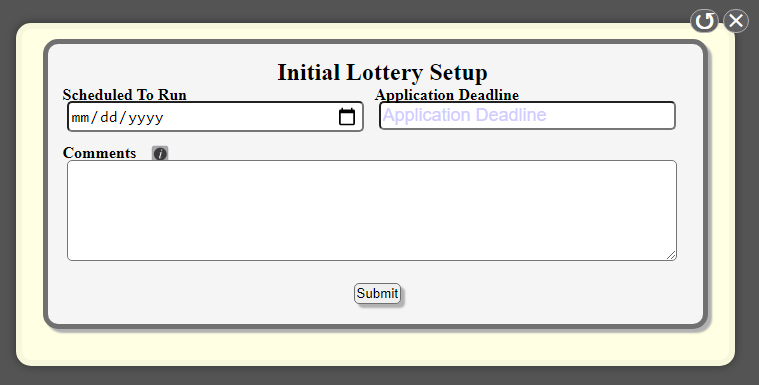 You can create a new lottery by clicking on the "Add New Lottery" button. This will give you a screen to set up the date you anticipate the lottery to be run, when the application deadline is for that lottery (students must apply on or before the date/time of the application deadline) and any additional comments you would like to add about the lottery.
This creates the lottery and adds it to your future lottery list. From there you will need to set up the lottery process. To learn more about the lottery settings, go to the "Lottery Setup" page.
To access the Lottery component of the registration system, go to the Lotteries section of the system. You will be presented with a list of the lotteries that have been scheduled or set up.
Student Registration | Lotteries |
This creates the lottery and adds it to your future lottery list. From there you will need to set up the lottery process. To learn more about the lottery settings, go to the "Lottery Setup" page.
Tools Available
Next to each lottery that you have set up you will see a set of buttons for that lottery:
Settings - Set up the settings and options for the lottery. Learn more about the options here.
View Lottery Details - This page will give you a breakdown of all of the lottery settings and students who will be eligible. It provides a list of the settings and the number of seats to be filled. It is a good idea to review this before you run the lottery to make sure everything is set the way you would like it.
List Eligible Students - This will provide a table of all of the students who are eligible for this lottery.
Run Lottery Now - Pushing this button will immediately run the lottery based on the settings you have set up. Please be patient after pressing this button as it may take a few minutes to run the process depending on the number of students and the settings you are using. After it is complete, it will take you to a confirmation screen. The confirmation screen will also provide you with a PDF file you can download with the lottery results.
Duplicate This Lottery - Create a new lottery using all of the settings from the selected lottery.
Remove Lottery - Trash this lottery and remove it from the system.
Finding Previous Lotteries
For lotteries run on the current system, the following tools are available for each lottery:
View Lottery Summary - This returns you to the summary page from when you first ran the lottery.
View Lottery Results - This will provide you with a list of students whose statuses were changed during the lottery, providing you a list of what their lottery was before and after the lottery was run.
View File - This will provide you with the PDF version of the lottery results to download outlining the results of the lottery.
Duplicate This Lottery - Create a new lottery using all of the settings from the selected lottery.
Send Notifications - The system does not automatically inform parents of the lottery results. This is so that you can review the results to be sure there are no errors. Then, once you are ready you can use this tool to write and send personalized mail-merge emails to students who were accepted or added to the waiting list. You can also send SMS notifications.
Undo This Lottery - This will undo the results of the lottery and roll all of your students back to their original status before you ran the lottery. It also returns the lottery to the list of future lotteries so that you can rerun it after you fix whatever issues you found in the process.
Related Articles
Merge Students
The Student Registration System has a tool built in that will help you find duplicate students and individuals and merge their accounts together. This is helpful if you have families who submit multiple applications for students hoping to circumvent ...Custom Search
The student registration system allows you to build custom searches based on your own criteria, and to define which fields you would like shown on the search. Many features of the system use these custom searches to operate, such as the student ...